Glance service is provided via Sessions. Each successful session has two or more Session Guests.
These are possible session status values, described in detail in the next section:
- A - Active, both sides have joined (host/guest or agent/visitor)
- C - Completed (session has ended)
- D - Guest declined a view session during Screenshare
- E - Problem connecting to the Cobrowse Asset Management (CAM) Service
- J - Session is being set up, and is waiting for a cobrowse or screenshare server
- L - Locked
- Q - Quit. Session was Waiting, but was ended by host or visitor before other side joined
- T - Timed out. Session was Waiting but other side did not join within timeout
- U - The session was ended in an unknown state
- W - Waiting, other side has not joined yet
- X - Completed (session ended but without a clean close)
A - Active
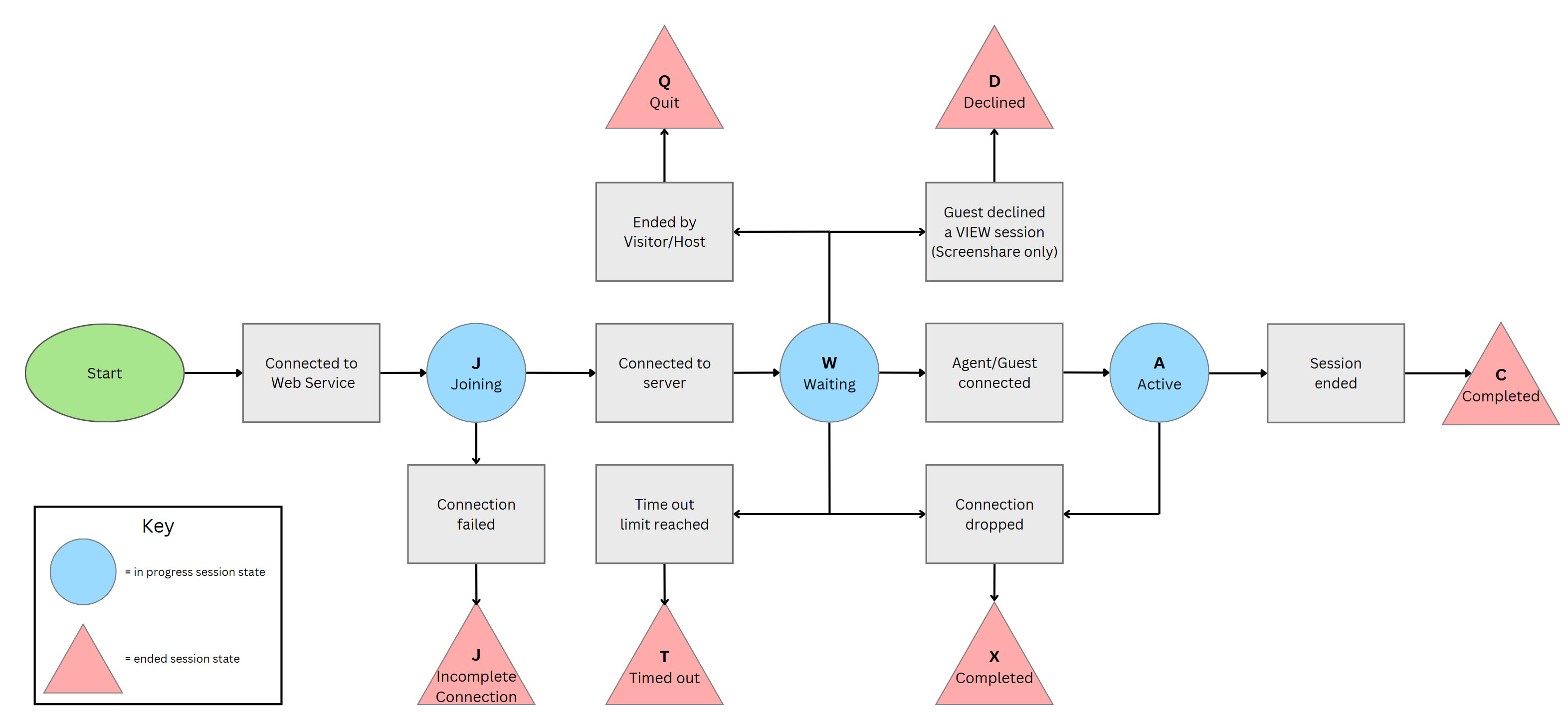
An active session is one that is in use by a Glance subscriber and one or more other guests. After use, every A session will transition to become a C session or X session.
C - Completed and X - Completed
Upon completion, each A session becomes either a C session or X session.
Sometimes session guests (including Glance subscribers and website visitors) end their A sessions by closing their browser windows or disconnecting from the network. When that happens, a session may become an X session because it did not end with a "clean close" by using Glance's session ending protocol.
- Sometimes A sessions end when a guest requests the end of the session. Those sessions become C sessions.
- Both C and X sessions represent a successful interaction.
- C sessions and X sessions do not transition to any other state.
J - Session is being set up
Newly-created sessions have this status. A session is created at the time a website visitor initiates a cobrowse session, or when a Glance subscriber starts a screenshare or video session.
L - Locked
A very few screenshare sessions get into the L state, and no cobrowse sessions. This state is part of Glance's way of preventing multiple sessions from different host machines for the same subscriber.
L sessions do not transition to any other state.
Q - Quit
Sometimes the originator of a session'screenshare host or cobrowse website visitor'ends a session before any other session guest joins. That makes the W session become a Q session. Q sessions do not transition to any other state.
T - Timed Out
W sessions cannot remain W sessions forever. If no second guest joins the session, it eventually times out and becomes a T session.
Screenshare and video sessions take ten minutes to time out. Cobrowse sessions take two minutes to time out. T sessions do not transition to any other state.
W - Waiting
W sessions are completely set up. Each W session has one guest: the originator. It is waiting for other guests to connect.
In the case of a cobrowse session, typically the W status means that the web site visitor is waiting for an agent to connect. But, if a website visitor inadvertently starts a session (by pressing a hotkey or clicking a cobrowse link, for example) the session will enter the W state, and then will transition either to the Q or T state when the user stops the session or when it times out. So, not all W states mean a website visitor is waiting for an agent to respond.
In the case of screenshare or video sessions, the W status means the session has been initiated by the host and is waiting for guests to join.
Every W session will transition to become an A session, Q session, or T session.
Session Status Flow Chart
Below is a flow chart displaying how a session can progress through the various statuses:
Session Guest Status
These are possible guest status values:
- A - Active (guest connected)
- C - Completed (guest has left)
- D - Guest declined the session
- E - Unexpected error occurred
- J - Joining (guest is in process of connecting but has not yet connected)
- P - Another viewer instance was opened by the same guest
- R - Temporary status that occurs when the server is waiting for a reconnect from the client
- T - Session timed out
- W - Temporary status that occurs when a different display side has connected but updates are not yet being sent
- X - Guest left session, by closing a browser window or dropping the session some other way