Note
To see visitor information, you must use version 3.42 or later of the Glance for Salesforce Package. This feature is only available during 1-Click Connect for Cobrowse or Mobile SDK sessions. When using 1-Click Connect, agents can preview the visitor's device, browser, and current URL before joining the session. This allows agents to understand the visitor's environment immediately. Note: Available details may vary depending on the visitor's device.
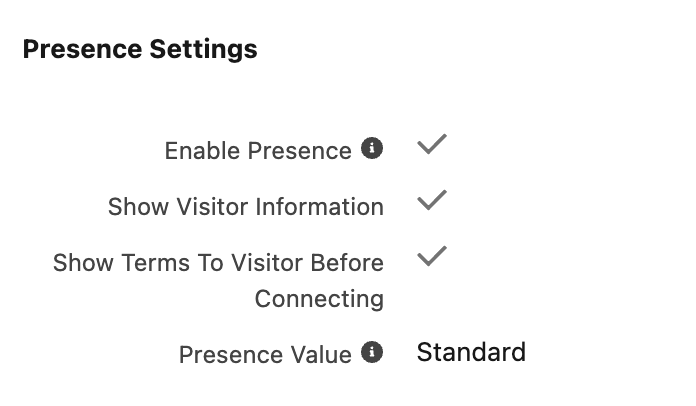
- Navigate to the Glance Company Settings page within Salesforce.
- Scroll down to the Presence Settings section.
- Select Show Visitor Information to enable this feature.
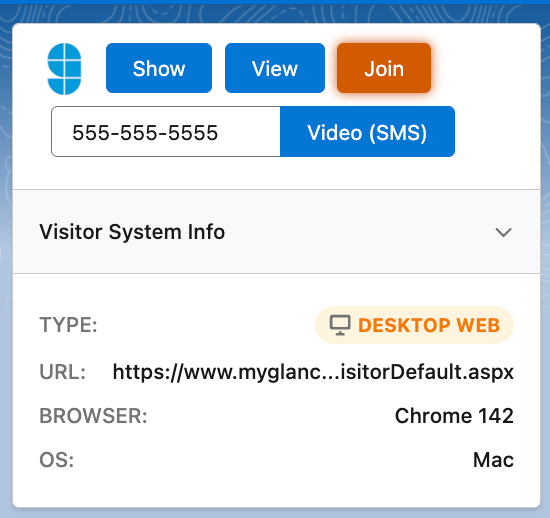
When a visitor is detected on the current Salesforce Object, the Glance Component displays the following information:
- Type: Desktop Web, Mobile Web, or Mobile App (SDK).
- URL: The URL of the page the visitor is browsing; you can hover over the URL to view the entire path.
- Browser: The browser the visitor is using and its version.
- OS: The Operating System for the visitor.