
A user can be authenticated to various Glance services, either on the web or via the clients using a Login Key.
Authentication requires a Glance PartnerId (Group ID), a PartnerUserId (PUID) that identifies the User within the Group, and a LoginKey. All three are passed on a web page URL or a custom protocol URL invoking the client.
Glance for Salesforce generates a LoginKey using the API Key provisioned in the customer Org Custom Settings, the PartnerUserId (from the specified Salesforce User field) and the GroupId of the default admin user.
Glance for Salesforce then passes the LoginKey, PartnerId, and PartnerUserId to Glance.
For web agents, these are posted to the Cobrowse viewer page URL. See the Single Sign-On section under Joining a Session Through CRM Integration in the Glance Cobrowse Setup Guide.
For agents using the Glance Client (formerly Panorama), the LoginKey and other parameters are passed to the client on the glancepanorama://... protocol URL.
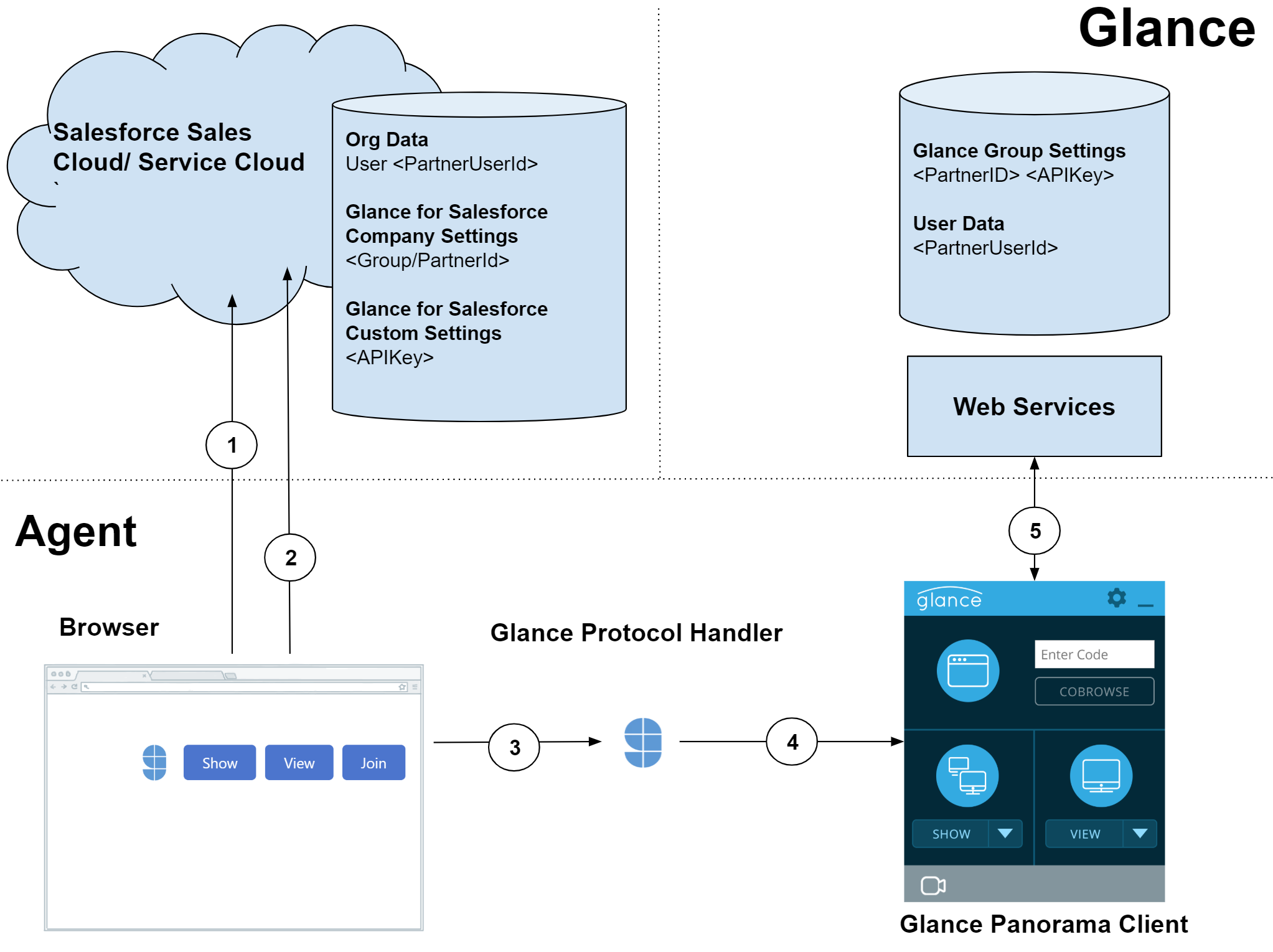
Flow Diagram
Detailed Flow
- The agent browser requests an object (Lead, Contact, Case) from Salesforce. The Salesforce server serves a page layout with an embedded Glance for Salesforce Visualforce page.
- The browser requests the Glance for Salesforce Visualforce page.
- The Glance for Salesforce Apex code retrieves the PartnerId (GroupId) from Company Settings, PartnerUserId from the specified User field, and shared secret APIKey from Custom Settings.
- Generates the LoginKey and
glancepanorama://protocol URL. - Responds with a page containing buttons, JavaScript, and URL.
- The Glance for Salesforce Apex code retrieves the PartnerId (GroupId) from Company Settings, PartnerUserId from the specified User field, and shared secret APIKey from Custom Settings.
- The agent clicks the Glance button.
- The JavaScript invokes a protocol URL.
- The registered protocol handler (
GlanceLauncher.exe) opens with a URL containing the command and parameters: PartnerId, PartnerUserId, LoginKey.
- The JavaScript invokes a protocol URL.
- The protocol handler
.exefile launches the Glance Client (if not running), then transmits the protocol URL (via ServiceModel/named pipes). - The client calls Glance Web Services to authenticate, passing the PartnerId, PartnerUserId, and LoginKey.
- Web Services uses PartnerId to retrieve the secret APIKey, and validates the LoginKey. It then maps the PartnerUserId to a Glance user, and validates access and privileges. The web service returns validation, privileges, and settings, and for actions that start a session, returns a server and server key.